Posts

Node-Red & Mosquitto quick install, Linux, Ubuntu, Raspberry OS

Image
Updated 2025-09-08 ! A fantastic way to distribute data between devices is using MQTT . In this post I will do a quick and simple setup with Node-Red(NR) and the Mosquitto(MQ) broker on a Linux machine. Very short, the Broker , installed on a server, handles incoming Publishing and Subscriptions from clients. Every published  Message is "linked" to a Topic.  All Subscribers use a  Topic to "link" to the right Message . How to install Node-Red(NR)  is found here  and the MQ manual here .

ZeroTier Tutorial: Secure Remote Access to Home Assistant & Ubuntu Server + Desktop

Image
For a long time I have checked for a good solution to reach my servers at home. My  thoughts   now have finalized in the VPN solution Zero Tier(ZT) where I reach Ubuntu desktop with "RDP" and Ubuntu server with "ssh". The ZT solution also works great with the Home Assistant(HA) browser access and the HA Mobile App. Until now I have used remote.it but ZT will manage all of my network resources as if they were on the same LAN . The Ubuntu desktop installation is running a Linux KVM with HA and an Ubuntu server Lite as  guests .  Setup here .

GPS tracker, GT06, easy setup !

Image
  I really like the products on AliExpress and Alibaba, but in most cases the documentation is very simple and to short. So when I bought a combined tracker and a burglar alarm, to our boat, I really tried to get the best. One important thing was that, if possible, getting a lifetime app support. The purchase went well and 14 days later it arrived in Sweden.

Installing Ubuntu, linux, on an Mac Mini (2018) and MacBookAir (2010)

Image
It's almost become a sport to revive old Macs..... 😉 This short post will address some obstacles found during install of a new OS. The Mac Mini:s WiFi controller wasn't found ! The MacBook Air didn't manage to do a USB boot with Ubuntu !

Signal K, stream data changes

Image
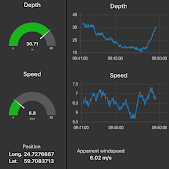
Updated 2025-06-28 ! Are You searching for a solution where You want to create graphs and gauges from SignalK(SK) data ? Use NodeRed(NR), installed as a SK plugin , with the standard dashboard and it's easy to create info as seen in the picture. And this is without a database as InfluxDB and tools like Grafana. You use the WebSocket interface , or SK subscribe nodes, to subscribe to changes in data from the SK server. 

One-liner Internet speedtest, Linux CLI, Node-Red, Home Assistant

Image
We’ve been using Mobile Broadband for several years and have always been keen to measure the speed from our Internet Service Provider (ISP). I’ve posted several variants , mostly Node-RED(NR) flows and programs that often use Python. I’m now slowly converting to Home Assistant(HA), and was glad there was an integration,   Speedtest , to do the job.  But I couldn’t get it to work since HA didn’t like that the test took more than 10 seconds,  Then I tried a Speedtest NR node, but it didn’t install because it needed Python dependencies...... (NR was installed as a HA "Add-on")

Volvo Penta D4/D6 water pump leak

Image
Updated 2025-06-10 ! The sea water pump, labeled 3589907 and replaced by 21380890, was leaking a little so a change of seal was necessary. Numbers below refers to the explode view. Detach the generator belt from the pump pulley and the 2 hoses from the pump. Unscrew the water pump, 4 scews, from the engine block. Remove the cover, 7, from the pump. Pull out the impeller, 6. Remove the cam, 4, by unscrewing screw 18. Remove the washer, 22. Remove the lock ring 14 and washer 21. With a pliers try to remove the seal 8.

Home Assistant core install, Raspberry Pi and Python 3.12 & 3.13

Image
Updated 2025-06-02 ! This will soon be a deprecated installation method !! Another post with Linux KVM and HA easy start . The best way to start with Home Assistant (HA), and Raspberry Pi(RPi), is off course to use the ”Raspberry Pi imager” and in the menu select " Other specific-purpose OS => Home Assistant and home automation => Home Assistant ". This will install the HA operating system. It works very well and here are the install instructions .  On the other hand if you want to add HA to a RPi which you already have up and running, without Docker, you need to install something which is called " Home Assistant Core ". Please check the " Remarks " below before you start. New version for Python 3.13 ! Below info is not updated but just change from 3.12 to 3.13 

Home Assistant and Node-RED

Image
Node-Red (NR) is  Flow-based programming for the Internet of Things. I have in the past  written a lot of posts  for Node-RED and the   HA implementation  makes it easy to interact with HA:s entities. The best thing is that even if you don't are a skilled programmer, but like logic flows, you can make really advanced things and it really complements the logic that could be made within Home Assistant(HA). In this post I will do a quick introduction to what is possible with NR together with HA.

Popular posts, last 30 days

OpenPlotter V3, install guide

OpenPlotter v4 , install guide

iCloud drive sync, or mount, with a Linux, Ubuntu, device

Raspberry headless install with WiFi

Victron monitoring solution, Venus, on Raspberry

HomeKit bridge with Ring

NetworkManager UI and access point, hotspot

IVT, Bosch heat pump easy integration, Home Assistant

Signal K quick install, Raspberry Pi, Ubuntu