
AIS reciever for Raspberry Pi, 2 channel

This post covers the setup for a AIS, dual channel, receiver for Raspberry Pi(RPi) with systemd autostart.
I'm using the
RTL-SDR dongle V3
with almost zero temperature drift or the even better NooElec NESDR Nano 3
AIS posts with charts/maps
Improve receiving range? Calibrate ! Instructions in this post
The best AIS application ? is found here !
AIS posts with charts/maps
Improve receiving range? Calibrate ! Instructions in this post
The best AIS application ? is found here !
The actual AIS software is RTL-AIS
which connects to the dongle and outputs NMEA0183(N1) VDM
sentences. The setup is used in the NMEA WiFi project.
If You want to start with a fresh Raspberry installation here is a post using Mac/PC/Linux.
The fantastic OpenPlotter(OP) project with guys Sailoog/e-sailing have done a package which is very easy to use. I really recommend the OP method, Installation A, compared with installing from source. (If You are using OP use the app "SDR VHF" instead)
The fantastic OpenPlotter(OP) project with guys Sailoog/e-sailing have done a package which is very easy to use. I really recommend the OP method, Installation A, compared with installing from source. (If You are using OP use the app "SDR VHF" instead)
Warning !
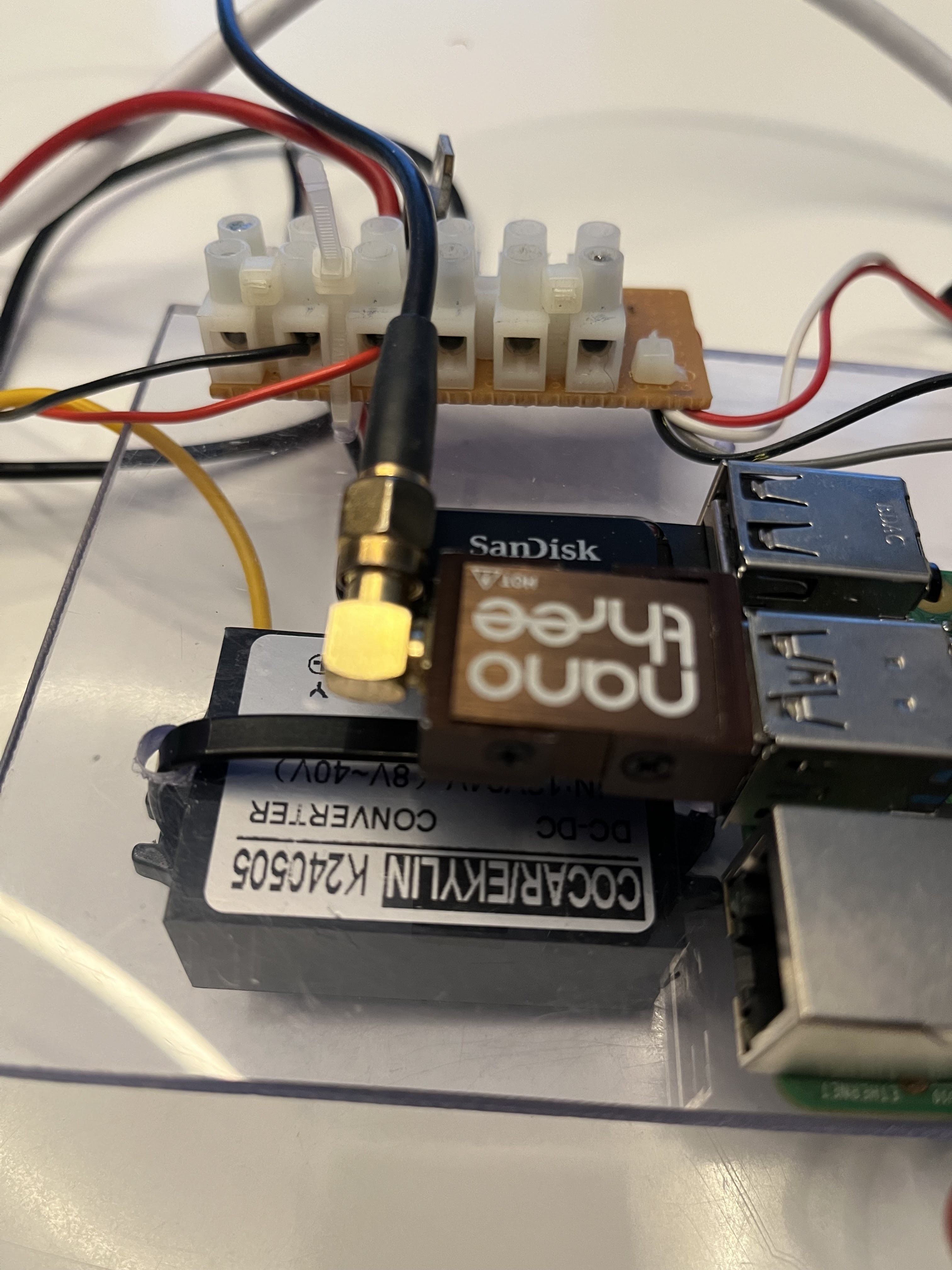
I'm using this setup on our boat and are using a simple buck converter, 12V DC => 5V DC, to source the Raspberry Pi 4. In this case the converter was placed direct below the SDR and interfered so much that there was almost no reception. So check for a good power supply, away from the dongle, and shielding.

As a last measure I added a ferrite bead on the USB cable which also increased the reception range.
Update OS
You must update cause there are bugs in older firmware. Open a terminal window/ssh and start with an update of the
OS and firmware
$ sudo apt update && sudo apt full-upgrade -y && sudo apt clean
Installation A, from Openplotter package
If you are running this variant of software and get an error "Segmentation fault" you must use the other, B, method!!
$ sudo apt update && sudo apt full-upgrade -y && sudo apt clean
Installation A, from Openplotter package
If you are running this variant of software and get an error "Segmentation fault" you must use the other, B, method!!
Start with dependencies for RTL-AIS
$ sudo apt install librtlsdr-dev libpthread-stubs0-dev
Choose a package file for Your OS. For RPi "standard" 32 bit download
$ wget https://launchpad.net/~sailoog/+archive/ubuntu/openplotter/+files/rtl-ais_0.4.2-stable_armhf.deb
and install
$ sudo dpkg -i rtl-ais_0.4.2-stable_armhf.deb
$ sudo apt install librtlsdr-dev libpthread-stubs0-dev
Choose a package file for Your OS. For RPi "standard" 32 bit download
$ wget https://launchpad.net/~sailoog/+archive/ubuntu/openplotter/+files/rtl-ais_0.4.2-stable_armhf.deb
$ sudo dpkg -i rtl-ais_0.4.2-stable_armhf.deb
If running RPi 64 bit
$ wget https://launchpad.net/~sailoog/+archive/ubuntu/openplotter/+files/rtl-ais_0.4.2-stable_arm64.deb
and install
$ sudo dpkg -i rtl-ais_0.4.2-stable_arm64.deb
continue below with "Testing"
Installation B, from source
Start with dependencies for RTL-AIS
$ sudo apt install librtlsdr-dev
With GIT
If You don't have the GIT package install it with
$ sudo apt install git
Clone RTL-AIS from github
$ git clone https://github.com/dgiardini/rtl-ais
Without GIT
$ wget https://github.com/dgiardini/rtl-ais/archive/master.zip
$ unzip master.zip && mv rtl-ais-master rtl-ais
Then go to the created directory and compile
$ cd rtl-ais
$ make
Copy the program to the right place.
$ sudo cp rtl_ais /usr/bin
Testing
Connect the dongle to the RPi, and an antenna to the dongle, and start the software with
$ sudo rtl_ais -R on -n
and something like this will appear with the VDM sentences at the end
Exit with Ctrl+C
As You see the N1 data is available as UDP data at port 10110
Clean up with rm -rf /home/pi/rtl-ais/ /home/pi/master.zip
Autostart with systemd
Autostart with systemd will make the rtl-ais software start at boot and restart if it fails.
Create a file with
$ sudo nano /etc/systemd/system/ais.service
and add the following configuration
[Unit]
(If you don't want to log the NMEA sentences remove the "-n" from the "ExecStart" line above)
Many thanks to "dgiardini" who is maintaining the software and helped me with the Buster fix.
$ sudo apt install librtlsdr-dev
With GIT
If You don't have the GIT package install it with
$ sudo apt install git
Clone RTL-AIS from github
$ git clone https://github.com/dgiardini/rtl-ais
Without GIT
$ wget https://github.com/dgiardini/rtl-ais/archive/master.zip
$ unzip master.zip && mv rtl-ais-master rtl-ais
Then go to the created directory and compile
$ cd rtl-ais
Please note that there are a bug in Buster ! Check at Buster below
$ make
Copy the program to the right place.
$ sudo cp rtl_ais /usr/bin
Testing
Connect the dongle to the RPi, and an antenna to the dongle, and start the software with
$ sudo rtl_ais -R on -n
and something like this will appear with the VDM sentences at the end
Edge tuning disabled.
DC filter enabled.
RTL AGC enabled.
Internal AIS decoder enabled.
Buffer size: 163.84 mS
Downsample factor: 64
Low pass: 25000 Hz
Output: 48000 Hz
Found 1 device(s):
0: NooElec, NESDR Nano 3, SN: XXXXXX
Using device 0: Generic RTL2832U OEM
Detached kernel driver
Found Rafael Micro R820T tuner
Log NMEA sentences to console ON
AIS data will be sent to 127.0.0.1 port 10110
Tuner gain set to automatic.
RTL AGC mode ON
Tuned to 162000000 Hz.
Sampling at 1600000 S/s.
Allocating 12 zero-copy buffers
!AIVDM,1,1,,B,137KW60018PqU<bP6M2<?9iV08N=,0*7E
!AIVDM,1,1,,A,15V3Qh000I0qPQ8P7al=9bAf08Qf,0*6B
!AIVDM,1,1,,A,137KW60018PqU5DP6MQ<?ah00D1;,0*0B
!AIVDM,1,1,,B,137KW60018PqTtFP6N6t?IhF086b,0*1A
DC filter enabled.
RTL AGC enabled.
Internal AIS decoder enabled.
Buffer size: 163.84 mS
Downsample factor: 64
Low pass: 25000 Hz
Output: 48000 Hz
Found 1 device(s):
0: NooElec, NESDR Nano 3, SN: XXXXXX
Using device 0: Generic RTL2832U OEM
Detached kernel driver
Found Rafael Micro R820T tuner
Log NMEA sentences to console ON
AIS data will be sent to 127.0.0.1 port 10110
Tuner gain set to automatic.
RTL AGC mode ON
Tuned to 162000000 Hz.
Sampling at 1600000 S/s.
Allocating 12 zero-copy buffers
!AIVDM,1,1,,B,137KW60018PqU<bP6M2<?9iV08N=,0*7E
!AIVDM,1,1,,A,15V3Qh000I0qPQ8P7al=9bAf08Qf,0*6B
!AIVDM,1,1,,A,137KW60018PqU5DP6MQ<?ah00D1;,0*0B
!AIVDM,1,1,,B,137KW60018PqTtFP6N6t?IhF086b,0*1A
Clean up with rm -rf /home/pi/rtl-ais/ /home/pi/master.zip
Autostart with systemd
Autostart with systemd will make the rtl-ais software start at boot and restart if it fails.
Create a file with
$ sudo nano /etc/systemd/system/ais.service
and add the following configuration
[Unit]
Description=AIS
After=syslog.target network-online.target
[Service]
Type=simple
User=root
ExecStart=/usr/bin/rtl_ais -R on -n
Restart=on-failure
RestartSec=10
KillMode=process
[Install]
WantedBy=multi-user.target
After=syslog.target network-online.target
[Service]
Type=simple
User=root
ExecStart=/usr/bin/rtl_ais -R on -n
Restart=on-failure
RestartSec=10
KillMode=process
[Install]
WantedBy=multi-user.target
And then the following commands to get it up and running
$ sudo systemctl daemon-reload
Check with the following command
If You have problems and would like to clean up, use the following commands
 SignalK(SK)
$ sudo systemctl daemon-reload
$ sudo systemctl enable ais
Created symlink
/etc/systemd/system/multi-user.target.wants/ais.service →
/etc/systemd/system/ais.service.
$ sudo systemctl start ais
Check with the following command
$ sudo systemctl status ais
You will get something like this if You succeed
You will get something like this if You succeed
●
ais.service - AIS
Loaded:
loaded (/etc/systemd/system/ais.service; enabled; vendor preset:
enabled)
Active: active (running)
since Tue 2018-06-26 11:05:10 CEST; 41s ago
Main PID: 1648
(rtl_ais)
CGroup:
/system.slice/ais.service
└─1648 /home/pi/rtl-ais/rtl_ais -p 0 -R on -n
Jun 26 11:05:22 Zest rtl_ais[1648]:
!AIVDM,1,1,,A,14`a0?001dPqOmHP6io<K9td08=9,0*01
Jun 26 11:05:28 Zest rtl_ais[1648]:
!AIVDM,1,1,,A,B3uK=1P0=h>H22`1l69VSweUkP06,0*6B
Jun 26 11:05:28 Zest rtl_ais[1648]:
!AIVDM,1,1,,A,13A4g<00000qhP4P3vLLS84p08@e,0*50
Jun 26 11:05:31 Zest rtl_ais[1648]:
!AIVDM,1,1,,B,14`a0?001ePqOd0P6ja<K9tv058D,0*18
Jun 26 11:05:32 Zest rtl_ais[1648]: !AIVDM,1,1,,B,402R3a447wP000r;6vP4fwG00l4;,0*6B
Jun 26 11:05:32 Zest rtl_ais[1648]: !AIVDM,1,1,,B,402R3a447wP000r;6vP4fwG00l4;,0*6B
If You have problems and would like to clean up, use the following commands
$ sudo systemctl stop ais && sudo systemctl disable ais
and then delete the ”ais.service” file.
 SignalK(SK)
If You are using SK
and want to receive the N1 data? In the admin GUI go to ”Server =>
Data Providers” and add
- Input type: NMEA0183
- ID: AIS
- NMEA 0183 Source: UDP
- Port: 10110
Restart SK and check.
OpenCPN/OpenPlotter
Connection for OpenCPN
- Click the Options-icon
- Connections-tab
- Add Connection
- Network
- Protocol: UDP
- Address: IP address of workstation (localhost)
- DataPort: 10110
- Check “Show NMEA Debug Window” to see incoming messages.
Many thanks to "dgiardini" who is maintaining the software and helped me with the Buster fix.
Buster
Because of a bug You have to edit the "Makefile", with "nano Makefile", and the line in the beginning
LDFLAGS+=$(shell pkg-config --libs librtlsdr)
LDFLAGS+=$(shell pkg-config --libs librtlsdr)
or
LDFLAGS+=-lpthread -lm -L /usr/lib/arm-linux-gnueabihf/
should be changed to
LDFLAGS+=-lpthread -lm -lrtlsdr -L /usr/lib/arm-linux-gnueabihf/
Note !!
If You did a "make" before the change of the Makefile do a "make clean" and then "make" again.


Comments
Can you tell me, which antenna you are using?
tia, Mike
First of all thanks for you input and updates on your blog.
I have installed and am using the scripts as above and can see and use the AIS information coming through on the Open Plotter set, I am having problems with the auto start routine and wondered if there was any solution to the problem or a fix.
I can see both GPS and AIS information locally from the Rpi and I can see GPS remotely but no AIS, any suggestions gratefully received, I am no expert in this field but can usually follow instructions as above.
Fair winds
Ian
". It remains processing
Grade blog👍
Take a look on AIS-catcher,
https://github.com/jvde-github/AIS-catcher
Post a Comment
Feel free to leave a comment ! ... but due to a lot of spam comments I have to moderate them. Will reply ASAP !