Posts

Shelly 1 quick install
Image
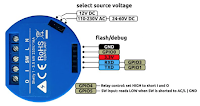
Updated 2023-05-04 ! This post focus on  Shelly 1 (S1), a really a nice automation device with great versatility, but much of the content is also valid for some of  Shellys other devices  using the gen1 API. Setup for the later version,  Shelly Plus 1 , is found here  !! S1 is a WiFi switch, 16 Amps, with dry contacts and t he function "without Internet" + that the S1 can use a 12V DC source makes it perfect for an "use case" in a  boat /mobile home. It's compatible with Alexa , Google  or HomeKit using HomeBridge  or as a "native" HomeKit device using  Mongoose firmware (Flashed via a standard WEB browser !)

Shelly PLUS 1 quick install

Image
Updated 2023-05-03 ! In a  former post I made a writing about Shelly 1 (S1) and this post will handle about the successor Shelly PLUS 1 (SP1)  but much of the content is also valid for some of  Shellys other devices  which uses the same software/API. To keep it simple, SP1 is a WiFi switch, 16 Amps, with dry contacts but compared to the S1 the hardware and the software is updated.  The function "without Internet" + that the SP1 can use a 12V DC source makes it perfect for an "use case" i n a boat/mobile home .

HomeKit bridge with Shelly/Shelly 1

Image
Updated 2023-05-01 ! I really recommend flashing, via WEB-browser, the device with Mongoose software to avoid Homebridge.   HomeBridge is used for this setup and to make it appear in the Apple Home app. The main advantage with the Shelly devices are that they are WiFi enabled and therefore You don't have to use a hub, this compared to z-way/zigbee and some other solutions.  First install Shelly1 (S1).

Bootable installer for "any" MAC OS

Image
Updated 2023-06-11 ! The use case is that I had an old iMac, max OS is High Sierra, that crashed and it didn't work with an Internet or Time Machine restore. The other MAC:s I have are running Catalina or Big Sur and if you try to download and older OS , via app-store, you just get an error saying that the running OS don't accept the download of an old OS. The universal way to create an USB installer seems to be using the command " createinstallmedia ", requires OS X 10.7 Lion or later, but you need the respective OS install app ! A new, better ??, without Python dependences is found here .

macOS Ventura on unsupported Mac

Image
In former posts, Big Sur (11.7) and Monterey (12.7),   I went through how to update an old MacBook Air 4.2, (mid 2011, SSD, 4 Gb memory) which has a Non-Metal GPU. In this post I will update a MacBook Air 6.2 with SSD, Mid 2013,  to Ventura(13.5) with the same patcher  but the latest version 6.2 !!  This is despite that  max OS  for this Mac is  Big Sur Awesome !! ! Supported models are found here .

Node-Red on MCU:s, Raspberry Pi Pico W

Image
Since I'm not a programmer, and probably never will be 😉, I really like Node-Red(NR). NR is also a nice way trying to learn some JavaScript via the function nodes. I also appreciate hardware, MCU s, like ESP32 and Raspberry Pi Pico but find it a little hard to code in MicroPython or C++. Somewhere ?? on the WEB i found some applications that can export NR json code to C++ and run it on several MCUs. As you understand I had to check it out... 

Upgrade from Buster to Bullseye, Raspberry

Image
Uppdated 2023-10-28 ! I have been running a Raspberry Pi 2(RPi) for several years with Buster and the applications; Homebridge(HB) Razberry , Z-way interface CUPS , printer software Node-RED (NR) When I started with the RPi it was Jessie, then Stretch and Buster. Every time I upgraded the SD card to the latest OS and it just worked. It should been said that I always waited a year or so and  I'm using the RPi headless without any GUI. Now it was time to go from Buster to Bullseye !

Raspberry/Linux print server Windows/Apple, CUPS

Image
Updated 2023-03-12 ! When we upgraded our WiFi to a Mesh solution, TP-link Deco M9 , our old printer, WiFi connected, didn't want to "play" with us anymore. This was due to stronger encryption which wasn't supported. Since the printer just have WiFi or USB connection, no standard Ethernet, I was looking for another solution. We have no computer running 24/7 except a Raspberry Pi, RPi, which is handling our home automation, Homebridge . So the solution was to use CUPS  on that RPi. On the web there are several posts/manuals how to install CUPS on a RPi so this post will refer to one of these and then some additional hints regarding, Apple AirPrint, Windows Network Printer, scanning....

NTP server on Raspberry & Linux(Offline)

Image
Uppdated 2023-02-01 ! The use case, creating an offline NTP , was that I'm on our boat sometimes don't have an Internet connection but always have a connected GPS. The GPS updates time on a  Raspberry(RPi)  running Signal K . The actual issue is that there are other devices on the LAN that needs to be updated and then you need an NTP server. Of course this setup is also valid for a RPi/server, with a RTC , acting as a NTP server in an isolated LAN.  

Seatalk 1 and NMEA2000 combined

Image
Updated 2023-01-20 ! Our boat was delivered, 2006, with just Raymarine equipment using network Seatalk 1(ST1), and some NMEA0183(N1). Updates and additional equipment will use the newer NMEA2000(N2K).  We will keep the two well functioning Raymarine 12”, E120, and the radar.  In addition, for Navigation purposes, we use the iPad app iSailor . The easy way to combine ST1 with N2K is to use the Raymarine Seatalk 1 to Seatalk NG(STNG) converter, Raymarine E22158 . STNG and N2K is the same protocol, with some dialectal differences, but have different cabling. Don't miss  this post  where I'm presenting additional solutions, including a NMEA WiFi gateway, and add ons.

OpenPlotter V2, install guide

Image
Updated 2023-01-02 ! OpenPlotter(OP), a Boat Navigation application, is really a nice and simple installation of OpenPlotter (OP) OpenCPN (OC) SignalK (SK)  and other supporting applications for Your boat. Please note that OP V2 is outdated use .......

Calculate wind using U and V GRIB components, NodeRed, JS

Image
Updated 2022-11-28 ! In a former post I showed how to download and extract data from forecast GRIB files but avoided to handle if the wind direction and speed was declared as U and V components, vectors.  In this post I will extract wind data from a GRIB forecast file and use the U V components to calculate, and display, wind speed and direction at a chosen point. The data is visualized as graphs in a NodeRed dashboard. Normally, using charts in NodeRed, the timestamp is taken from the time when the input message is created but here I will use the timestamp from the forecast, loading the whole chart in one go.

Speedtest LAN and Internet/WAN, iperf3

Image
Updated 2022-11-06 ! Sometimes I'm a little confused if it's the local network that is the bottleneck or if the ISP, Internet Service Provider, is slow. In a former post I used 2 applikations to get the information, from both the local LAN and Internet, but on the other hand it maybe hade been nice with a more lightweight approach.  From  this post  I got inspiration and discovered a nice little  application " iperf3 "  which  is available for several OS .

Internet speed measure II

Image
New to Node-Red (NR) ? Maybe start with a simple application You direct can benefit from. This application is measuring Your Internet connection at chosen intervals using   speedtest.net  and showing the result in a graph. If the speed is under a set value it will send You an e-mail. Show the measured  Internet speed in Apples Home app ?

Victron monitoring solution, Venus, on Raspberry

Image
Updated 2022-09-18 ! Victron have a  state-of-the-art monitoring solution used by the GX products. It can monitor their other system components  such as inverter/chargers, solar chargers, shunts, and batteries  both local and remote all over the world. If you have a smaller Victron solution it is nice to know that the same software, Venus OS(VOS), can run on a Raspberry Pi(RPi) instead of the more expensive and versatile GX products.

macOS Monterey on unsupported Mac

Image
Updated 2022-08-16 ! In a former post I went trough how to update an old MacBook Air 4.2, (mid 2011, SSD, 4 Gb memory) to Big Sur and in this post I will update the Mac to Monterey with the same patcher !!  This is despite that  max OS  for the Mac is  High Sierra. This is done, among other things, due to that t he patcher  handles Macs with graphic cards from 2008 - 2011 which Monterey doesn't do natively. Since my former upgrade, to Big Sur, included a format of the SSD disk I here used the  patcher to do an upgrade from Big Sur  to Monterey. Awesome !!!

RS-232 with displays & AV equipment

Image
The use case for this post is that a got a request from a customer where a commercial displays brightness, used for digital signage , should be put at a minimum when there is no people in the surroundings. After some checking I found that on most displays, even on our own TV set, there is a  connector for the  RS - 232 protocol  that accepts commands similar to the commands sent by the remote control. A nice explanation on how it works is found here .

Davis PWS linked to pwsweather.com

Image
If you are using Davis Personal/Professional weather stations (PWS) you will get a nice dashboard when you link your PWS to the Davis weatherlink (WL) site. What you probably really miss is a forecast displayed together with your PWS data. The picture is showing a part of the dashboard at pwsweather.com (PW) after you have linked your PWS to the site. An add on is that you via API:s can get both the current weather, forecast and other data free of charge, via the aerisweather.com (AW) site. This post will handle the setup and also a Node-Red dashboard interfacing the aeris API.

Node-Red multiple instances, RPi

Image
Updated 2022-07-04 ! O n the same server/hardware you can have a test environment for Node-Red(NR), separated from production separated instances for different applications Setup will follow for a Raspberry Pi(RPi) including how to  auto start at power on. A post for NR quick install .

NMEA 2000 temperature sensor, wet exhaust

Image
In former posts   I used the temperatur sensor DS18B20, in several applications, but now it was time for the boats exhaust temperature and checking out YDTC-13 from Yacht Devices (YDTC). ( But please note that the YDTC can be used in any temperature application.) When you are boating, using the engine, it's  very important that the cooling water  always is present otherwise major damages can follow.  In "wet exhaust" systems it's easy to get the temperature which I posted here .

Exhaust temperature measure, boat

Image
Updated 2022-06-10 ! In other posts I  blogged about a way to measure temperature with a Raspberry Pi(RPi), direct connected or via WiFi , together with the marine applikation SignalK(SK). In this post I will follow up with a short brief about the practical solution, measuring exhaust temperature in a boat and sending an alarm if the temperature exceeds a set value . In "wet exhaust" systems it is very important that the cooling water, injected in the exhaust system, always is present otherwise major damages can follow. If you wan't to avoid a RPi check  this post  with approved NMEA 2000 temperature sensors from Yacht Devices 

Wine, Windows apps on Linux, Raspberry

Image
What is Wine ?  The OpenSource project , themselves,  explains it as;  Wine (originally an acronym for "Wine Is Not an Emulator") is a compatibility layer capable of running Windows applications on several POSIX-compliant operating systems, such as Linux, macOS, & BSD So why ? In my case, I'm just running macOS and Linux, I had and old gadget where I had to change the settings and this could only be made with a windows program.

Read and write NMEA files, Openplotter, Signal K

Image
This post is written for those who runs Signal K(SK), or applications that indirect are using SK, and want to write log files that could be read for later use. Other applications could be Openplotter which includes SK or OpenCPN for example interfacing a NMEA 2000 network via SK. There are sample files within the SK installation which can be used, for testing purposes, before you have created your own log files from your boat trips. Check here at "Input file/data".

Read & write Linux, ext4, volumes with Windows & Mac

Image
In an other post  I explained how to access and edit the data on an USB attached drive with the Linux " standard"  ext4  filesystem.  In this post I will explain how to read, write or add files using Windows, File explorer, or Mac, Finder,  without third party software ! You "just" need a Linux machine, but since you want to access an ext4 filesystem there probably are a machine in the surroundings ? In this post I will use a "simple" Raspberry Pi(RPi) and the ext4 media attached to one of the USB ports.

macOS Big Sur on unsupported Mac

Image
Updated 2022-03-03 ! I'm having an old MacBook Air 4.2, (mid 2011, SSD, 4 Gb memory), which have been running Catalina for quite some time despite that the  max OS is  High Sierra. I have been using the great work by dosedudes1 and his Catalina patcher . Unfortunately he didn't continue with patches for newer OS:s but have helped with a new patcher . This patcher  even handles Macs with graphic cards from 2008 - 2011. Using the patcher i got the mentioned Mac up and running with Big Sur after just over an hour.   New post !! Upgrade to Monterey .

Popular posts, last 30 days

iCloud drive sync, or mount, with a Linux, Ubuntu, device

Raspberry Pi OS Lite with GUI, RDP, VNC, Chromium

Installing Ubuntu 24.04 or 24.10/25.04 on an old MacBook Air(2011)

Home Assistant with VirtualBox or Proxmox or Linux KVM ???

Waveshare CAN hat with Signal K & OpenPlotter

Clone the Raspberry boot disk

IVT, Bosch heat pump easy integration, Home Assistant

Raspberry Pi 2, 3, 4, 5 USB SSD or USB drive boot

IKEA Bäve dimmer hack II